Use the page range of an input spooled file
This section covers solutions of how you can use the page range of an input spooled file in order to only process a sub section of a spooled file specified on the PAGERANGE parameter as a from and to page number.
These scenarios are covered below:
Setup template to only process splf pages in the page range
When you map the contents of an input spooled file, then you will normally insert as repeat loop, that iterates across all of the pages in the input spooled file with the //page option as described here.
The input spooled file can however be limited in regards to a specific page range like shown below (where only page 17 to 27 are selected):
                     Work with Spooled File Attributes

 Job  . . . . . . . . : QPADEV0003      File . . . . . . . . : QPJOBLOG
   User . . . . . . . : KSE              Number . . . . . . : 000001
   Number . . . . . . : 875518           Creation date  . . : 08/06/23
 Job system name  . . : PMK250           Creation time  . . : 16:13:25

 Page range to print:
   Starting page  . . . . . . . . . . . : 17
   Ending page  . . . . . . . . . . . . : 27
This is setup on the PAGERANGE parameter on the spooled file.
The starting page and ending page can in the designer be found as the spooled file attributes://@startPage and //@endPage, so in the case above the //@startPage attribute contains the value 17 and //@endPage contains the value 27.
So we want the designer to limit a //page repeat loop to only run through the pages in the range 17 to 27. The current page number can be found with the Xpath function: position().
We can do that with this setup:
//page[position() >= //@startPage and position()<=//@endPage]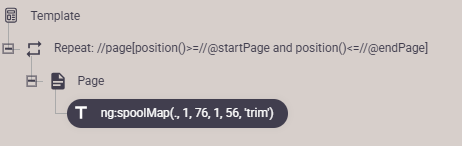
The expression inside [] limits the page (nodes) to only include the spooled file pages, where the expression inside is true. In the condition the condition is set, so that the expression is only true if the current page (found via the function: position() ) is larger or equal to the start page (of the page range) and less or equal to the end page.
Setup spooled file split to only process pages with the specified page range
If you want to combine the PAGERANGE parameter of the input spooled file with a split e.g. to generate multiple PDF files or emails from a single input spooled file, then you should follow the procedure below. The procedure first changes the payload containing the spooled file, so that it only contains the subset of pages before the spooled file split is executed.
This is possible with a workflow like this:

The elements are:
- The input: From IBM i output queue.
- XSL transformation on SPLFV2, which only includes pages within the page range of the input spooled file. This is the focus point here.
- Force content type. This is used after the transformation to tell the workflow, that the payload is still a spooled file.
- Split spool. Splits the spooled file.
- Create PDF file. Create a PDF file for each of the splitted spooled files.
The XSL transformation can be done in two ways. Here is the most simple one (including comments):
<?xml version="1.0" encoding="UTF-8"?>
<xsl:stylesheet version="2.0"
xmlns:xsl="http://www.w3.org/1999/XSL/Transform">
<!--
pagerange-filter.xsl
====================
Filters a SPLFv2 XML file so that only pages within the declared
page range are kept. All other data (attributes, metadata) is
preserved exactly as-is.
The page range is read directly from the <spool> element:
@startPage - first page to include (1-based position)
@endPage - last page to include (1-based position)
Page position is determined by count(preceding-sibling::page) + 1,
which correctly counts only <page> elements and ignores whitespace
text nodes between them.
Usage in an InterformNG2 workflow:
Add an "XSL Transformation SPLFV2" component and point it at this file.
No workflow variables or parameters required.
-->
<!-- ============================================================ -->
<!-- Identity transform: copy everything unchanged by default -->
<!-- ============================================================ -->
<xsl:template match="@* | node()">
<xsl:copy>
<xsl:apply-templates select="@* | node()"/>
</xsl:copy>
</xsl:template>
<!-- ============================================================ -->
<!-- Override for <page> elements: only emit pages whose -->
<!-- 1-based position falls within [@startPage .. @endPage] -->
<!-- on the parent <spool> element. -->
<!-- -->
<!-- NOTE: position() is NOT used here because it counts all -->
<!-- sibling nodes including whitespace text nodes, causing it -->
<!-- to never match the numeric page range. Instead we use -->
<!-- count(preceding-sibling::page) + 1. -->
<!-- ============================================================ -->
<xsl:template match="page">
<xsl:variable name="startPage" select="number(parent::spool/@startPage)"/>
<xsl:variable name="endPage" select="number(parent::spool/@endPage)"/>
<xsl:variable name="pos" select="count(preceding-sibling::page) + 1"/>
<xsl:if test="$pos >= $startPage and $pos <= $endPage">
<xsl:copy>
<xsl:apply-templates select="@* | node()"/>
</xsl:copy>
</xsl:if>
</xsl:template>
One small thing about the XSL above is, that the attributes, totalPages, startPage and endPage are unchanged. So they reflect the original spooled file. We can also update these 3 attributes to pretend that the spooled file never was longer. With these changes the startPage will be 1 and both endPage and totalPages will be the new number of pages.
The XSL below does that:<?xml version="1.0" encoding="UTF-8"?>
<xsl:stylesheet version="2.0"
xmlns:xsl="http://www.w3.org/1999/XSL/Transform">
<!--
pagerange-filter-with-totalPages.xsl
=====================================
Filters a SPLFv2 XML file so that only pages within the declared
page range are kept. All other data (attributes, metadata) is
preserved exactly as-is, with the exception of three attributes
on the <spool> element, which are recalculated to reflect the
retained page range:
@totalPages - set to (endPage - startPage + 1)
@startPage - reset to 1
@endPage - reset to (endPage - startPage + 1)
The page range is read directly from the <spool> element:
@startPage - first page to include (1-based position)
@endPage - last page to include (1-based position)
Page position is determined by count(preceding-sibling::page) + 1,
which correctly counts only <page> elements and ignores whitespace
text nodes between them.
Usage in an InterformNG2 workflow:
Add an "XSL Transformation SPLFV2" component and point it at this file.
No workflow variables or parameters required.
-->
<!-- ============================================================ -->
<!-- Identity transform: copy everything unchanged by default -->
<!-- ============================================================ -->
<xsl:template match="@* | node()">
<xsl:copy>
<xsl:apply-templates select="@* | node()"/>
</xsl:copy>
</xsl:template>
<!-- ============================================================ -->
<!-- Override for <spool>: copy all attributes, but replace -->
<!-- @totalPages, @startPage, and @endPage with recalculated -->
<!-- values reflecting the retained page range. -->
<!-- ============================================================ -->
<xsl:template match="spool">
<xsl:variable name="startPage" select="number(@startPage)"/>
<xsl:variable name="endPage" select="number(@endPage)"/>
<xsl:variable name="newTotal" select="$endPage - $startPage + 1"/>
<xsl:copy>
<!-- Copy all attributes except the three we recalculate -->
<xsl:apply-templates select="@*[not(name() = 'totalPages' or name() = 'startPage' or name() = 'endPage')]"/>
<!-- Reset startPage to 1 -->
<xsl:attribute name="startPage">1</xsl:attribute>
<!-- Reset endPage to the new page count -->
<xsl:attribute name="endPage">
<xsl:value-of select="$newTotal"/>
</xsl:attribute>
<!-- Reset totalPages to the new page count -->
<xsl:attribute name="totalPages">
<xsl:value-of select="$newTotal"/>
</xsl:attribute>
<!-- Process child nodes (the pages) -->
<xsl:apply-templates select="node()"/>
</xsl:copy>
</xsl:template>
<!-- ============================================================ -->
<!-- Override for <page> elements: only emit pages whose -->
<!-- 1-based position falls within [@startPage .. @endPage] -->
<!-- on the parent <spool> element. -->
<!-- -->
<!-- NOTE: position() is NOT used here because it counts all -->
<!-- sibling nodes including whitespace text nodes, causing it -->
<!-- to never match the numeric page range. Instead we use -->
<!-- count(preceding-sibling::page) + 1. -->
<!-- ============================================================ -->
<xsl:template match="page">
<xsl:variable name="startPage" select="number(parent::spool/@startPage)"/>
<xsl:variable name="endPage" select="number(parent::spool/@endPage)"/>
<xsl:variable name="pos" select="count(preceding-sibling::page) + 1"/>
<xsl:if test="$pos >= $startPage and $pos <= $endPage">
<xsl:copy>
<xsl:apply-templates select="@* | node()"/>
</xsl:copy>
</xsl:if>
</xsl:template>
</xsl:stylesheet>
When you map the contents of an input spooled file, then you will normally insert as repeat loop, that iterates across all of the pages in the input spooled file with the //page option as described here.
The input spooled file can however be limited in regards to a specific page range like shown below (where only page 17 to 27 are selected):
Work with Spooled File Attributes
Job . . . . . . . . : QPADEV0003 File . . . . . . . . : QPJOBLOG
User . . . . . . . : KSE Number . . . . . . : 000001
Number . . . . . . : 875518 Creation date . . : 08/06/23
Job system name . . : PMK250 Creation time . . : 16:13:25
Page range to print:
Starting page . . . . . . . . . . . : 17
Ending page . . . . . . . . . . . . : 27
This is setup on the PAGERANGE parameter on the spooled file.
The starting page and ending page can in the designer be found as the spooled file attributes://@startPage and //@endPage, so in the case above the //@startPage attribute contains the value 17 and //@endPage contains the value 27.
So we want the designer to limit a //page repeat loop to only run through the pages in the range 17 to 27. The current page number can be found with the Xpath function: position().
We can do that with this setup:
//page[position() >= //@startPage and position()<=//@endPage]
The expression inside [] limits the page (nodes) to only include the spooled file pages, where the expression inside is true. In the condition the condition is set, so that the expression is only true if the current page (found via the function: position() ) is larger or equal to the start page (of the page range) and less or equal to the end page.
If you want to combine the PAGERANGE parameter of the input spooled file with a split e.g. to generate multiple PDF files or emails from a single input spooled file, then you should follow the procedure below. The procedure first changes the payload containing the spooled file, so that it only contains the subset of pages before the spooled file split is executed.
This is possible with a workflow like this:
- The input: From IBM i output queue.
- XSL transformation on SPLFV2, which only includes pages within the page range of the input spooled file. This is the focus point here.
- Force content type. This is used after the transformation to tell the workflow, that the payload is still a spooled file.
- Split spool. Splits the spooled file.
- Create PDF file. Create a PDF file for each of the splitted spooled files.
<?xml version="1.0" encoding="UTF-8"?>
<xsl:stylesheet version="2.0"
xmlns:xsl="http://www.w3.org/1999/XSL/Transform">
<!--
pagerange-filter.xsl
====================
Filters a SPLFv2 XML file so that only pages within the declared
page range are kept. All other data (attributes, metadata) is
preserved exactly as-is.
The page range is read directly from the <spool> element:
@startPage - first page to include (1-based position)
@endPage - last page to include (1-based position)
Page position is determined by count(preceding-sibling::page) + 1,
which correctly counts only <page> elements and ignores whitespace
text nodes between them.
Usage in an InterformNG2 workflow:
Add an "XSL Transformation SPLFV2" component and point it at this file.
No workflow variables or parameters required.
-->
<!-- ============================================================ -->
<!-- Identity transform: copy everything unchanged by default -->
<!-- ============================================================ -->
<xsl:template match="@* | node()">
<xsl:copy>
<xsl:apply-templates select="@* | node()"/>
</xsl:copy>
</xsl:template>
<!-- ============================================================ -->
<!-- Override for <page> elements: only emit pages whose -->
<!-- 1-based position falls within [@startPage .. @endPage] -->
<!-- on the parent <spool> element. -->
<!-- -->
<!-- NOTE: position() is NOT used here because it counts all -->
<!-- sibling nodes including whitespace text nodes, causing it -->
<!-- to never match the numeric page range. Instead we use -->
<!-- count(preceding-sibling::page) + 1. -->
<!-- ============================================================ -->
<xsl:template match="page">
<xsl:variable name="startPage" select="number(parent::spool/@startPage)"/>
<xsl:variable name="endPage" select="number(parent::spool/@endPage)"/>
<xsl:variable name="pos" select="count(preceding-sibling::page) + 1"/>
<xsl:if test="$pos >= $startPage and $pos <= $endPage">
<xsl:copy>
<xsl:apply-templates select="@* | node()"/>
</xsl:copy>
</xsl:if>
</xsl:template>
<?xml version="1.0" encoding="UTF-8"?>
<xsl:stylesheet version="2.0"
xmlns:xsl="http://www.w3.org/1999/XSL/Transform">
<!--
pagerange-filter-with-totalPages.xsl
=====================================
Filters a SPLFv2 XML file so that only pages within the declared
page range are kept. All other data (attributes, metadata) is
preserved exactly as-is, with the exception of three attributes
on the <spool> element, which are recalculated to reflect the
retained page range:
@totalPages - set to (endPage - startPage + 1)
@startPage - reset to 1
@endPage - reset to (endPage - startPage + 1)
The page range is read directly from the <spool> element:
@startPage - first page to include (1-based position)
@endPage - last page to include (1-based position)
Page position is determined by count(preceding-sibling::page) + 1,
which correctly counts only <page> elements and ignores whitespace
text nodes between them.
Usage in an InterformNG2 workflow:
Add an "XSL Transformation SPLFV2" component and point it at this file.
No workflow variables or parameters required.
-->
<!-- ============================================================ -->
<!-- Identity transform: copy everything unchanged by default -->
<!-- ============================================================ -->
<xsl:template match="@* | node()">
<xsl:copy>
<xsl:apply-templates select="@* | node()"/>
</xsl:copy>
</xsl:template>
<!-- ============================================================ -->
<!-- Override for <spool>: copy all attributes, but replace -->
<!-- @totalPages, @startPage, and @endPage with recalculated -->
<!-- values reflecting the retained page range. -->
<!-- ============================================================ -->
<xsl:template match="spool">
<xsl:variable name="startPage" select="number(@startPage)"/>
<xsl:variable name="endPage" select="number(@endPage)"/>
<xsl:variable name="newTotal" select="$endPage - $startPage + 1"/>
<xsl:copy>
<!-- Copy all attributes except the three we recalculate -->
<xsl:apply-templates select="@*[not(name() = 'totalPages' or name() = 'startPage' or name() = 'endPage')]"/>
<!-- Reset startPage to 1 -->
<xsl:attribute name="startPage">1</xsl:attribute>
<!-- Reset endPage to the new page count -->
<xsl:attribute name="endPage">
<xsl:value-of select="$newTotal"/>
</xsl:attribute>
<!-- Reset totalPages to the new page count -->
<xsl:attribute name="totalPages">
<xsl:value-of select="$newTotal"/>
</xsl:attribute>
<!-- Process child nodes (the pages) -->
<xsl:apply-templates select="node()"/>
</xsl:copy>
</xsl:template>
<!-- ============================================================ -->
<!-- Override for <page> elements: only emit pages whose -->
<!-- 1-based position falls within [@startPage .. @endPage] -->
<!-- on the parent <spool> element. -->
<!-- -->
<!-- NOTE: position() is NOT used here because it counts all -->
<!-- sibling nodes including whitespace text nodes, causing it -->
<!-- to never match the numeric page range. Instead we use -->
<!-- count(preceding-sibling::page) + 1. -->
<!-- ============================================================ -->
<xsl:template match="page">
<xsl:variable name="startPage" select="number(parent::spool/@startPage)"/>
<xsl:variable name="endPage" select="number(parent::spool/@endPage)"/>
<xsl:variable name="pos" select="count(preceding-sibling::page) + 1"/>
<xsl:if test="$pos >= $startPage and $pos <= $endPage">
<xsl:copy>
<xsl:apply-templates select="@* | node()"/>
</xsl:copy>
</xsl:if>
</xsl:template>
</xsl:stylesheet>